- Status: Confirmed / Patch Available
- CVE ID: CVE-2026-8917
- Severity: 8.4 / 10 (High)
- Affected Software: ASUS Armoury Crate, GPU Tweak III, GPU Tweak II, AI Suite 3
- Disclosure Date: August 10, 2026
- Source: ASUS Security Advisory Board
ASUS has issued an urgent security advisory regarding a critical flaw embedded within its ecosystem of system management utilities. The vulnerability, tracked as CVE-2026-8917, carries a severity score of 8.4 out of 10, placing it firmly in the high-risk category. This disclosure affects not only the flagship Armoury Crate application but also extends to the GPU Tweak III, GPU Tweak II, and AI Suite 3 software suites.
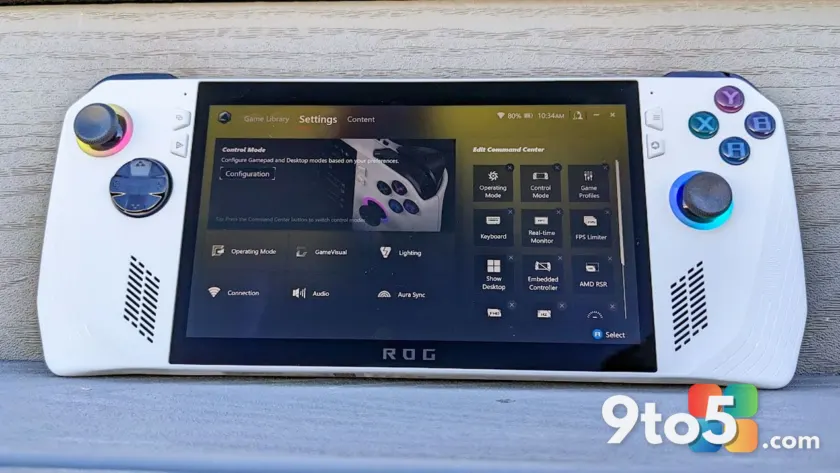
For owners of ASUS ROG and TUF gaming laptops, handhelds like the Xbox Ally X, and compatible desktop motherboards, this is not an issue to defer. The flaw creates a pathway for local attackers to manipulate system memory in ways that could compromise administrative control over your device.
Understanding the Technical Mechanism
The core of this vulnerability lies in how the affected ASUS components handle input/output control codes, commonly referred to as IOCTLs. According to the official CVE record, the flaw allows a local attacker to write a specific value to an arbitrary memory address.
In practical terms, this means the software fails to properly validate requests sent to the kernel. When a malicious program or script interacts with the vulnerable driver or service, it can bypass standard security checks. The most dangerous consequence of this memory manipulation is privilege escalation. If successful, an attacker operating with standard user permissions could elevate their access to that of a system administrator, granting them unrestricted control over the operating system, files, and installed applications.
This type of vulnerability is particularly concerning because it does not require remote access. An attacker only needs physical access to the machine or the ability to run code on the system, which can happen through phishing attacks or by visiting compromised websites.

Breakdown of Affected Software and Versions
ASUS has listed specific versions of its utilities that are impacted by this security flaw. However, the availability of patches varies across the different products. It is essential to check your current installation against the following details:
GPU Tweak III
ASUS has released a fixed version of this utility. The current build available on the ASUS support website is version 2.1.7.2. If you are running an earlier build, you are exposed to the vulnerability. Updating this package is straightforward and resolves the IOCTL issue.
GPU Tweak II
This is the most concerning entry on the list. The latest version currently hosted on the ASUS support page is version 2.4.0.0. Unfortunately, this version is explicitly listed on the CVE page as vulnerable. This indicates that ASUS has not yet developed or published a secure release for the legacy GPU Tweak II software. Users relying on this older utility are currently at risk until a patch is formally released.
AI Suite 3
For users of the AI Suite 3 motherboard utility, the situation is similar to GPU Tweak III. The ASUS support page currently lists version 3.01.10, which is newer than the affected version 2.1.2.0 cited in the advisory. This suggests that your system may already be running the patched version, but verification is recommended.
Armoury Crate
As the primary management hub for ASUS gaming hardware, this application is directly implicated. ASUS advises users to update Armoury Crate from within the application itself. The internal update mechanism should pull the latest secure components associated with your specific hardware model.
How to Verify and Secure Your System
If you own ASUS hardware, you should take the following steps to ensure your system is protected against CVE-2026-8917:
- Check Armoury Crate: Open the application and navigate to the settings or update menu. Allow it to check for the latest version. Ensure that all associated components, including GPU Tweak and AI Suite, are updated to their newest builds.
- Visit the ASUS Support Page: For GPU Tweak III and AI Suite 3, manually verify your version numbers against the latest releases on the official ASUS download center. If you are running older versions, download and install the updates immediately.
- Monitor GPU Tweak II: If you are still using GPU Tweak II version 2.4.0.0, be aware that no official fix is available yet. Consider migrating to GPU Tweak III if your hardware supports it, or monitor the ASUS security advisory board for future updates.
- Restart Your System: After installing updates, a full system restart is often necessary to ensure that the updated drivers and services are loaded into memory correctly.
Alternatives to ASUS Armoury Crate
While the security vulnerability is the immediate priority, many users have long sought alternatives to ASUS Armoury Crate due to its resource usage and occasional stability issues. If you decide to replace the software entirely, the community-favorite G-Helper is a viable option.
G-Helper is designed specifically for ASUS laptops and gaming handhelds. It provides essential functionality such as fan curve control, performance mode switching, and hardware monitoring. The application is significantly lighter than the official suite, occupying only about 5MB of disk space and running with minimal background overhead.
G-Helper can be downloaded for free from its official website. It is worth noting that while G-Helper covers most daily use cases, some specific ASUS desktop motherboards may still require Armoury Crate for certain hardware features to function correctly. Always verify compatibility with your specific model before fully removing the official software.
What This Means for You
This vulnerability highlights the risks associated with preinstalled system utilities that operate with high-level permissions. Even if you rarely interact with Armoury Crate or GPU Tweak, they are running in the background and interacting with your system kernel.
For everyday users, the immediate action is to update. The patch availability for GPU Tweak III and AI Suite 3 makes this a relatively quick fix. However, the lack of a patch for GPU Tweak II version 2.4.0.0 requires vigilance. If you cannot upgrade to GPU Tweak III, consider disabling the GPU Tweak II service from your startup programs to reduce the attack surface until ASUS releases a fix.
IT administrators managing fleets of ASUS devices should prioritize this update through their standard deployment tools. The privilege escalation nature of CVE-2026-8917 makes it a critical issue for enterprise security compliance.
Source: Latest from Windows Central
Over to you: Are you updating your ASUS utilities now, or have you already switched to G-Helper?