A coordinated impersonation campaign is currently ranking lookalike domains above official project pages in Google search results, and several of those sites are already serving trojanized installers to unsuspecting users. The operation targets widely used Windows utilities, including PowerToys, CrystalDiskMark, EasyBCD, Lively Wallpaper, and Wintoys. According to researchers at Check Point Research, the campaign has been quietly building search authority since at least September 2025, with active malware distribution beginning in January 2026.
The scale of the operation became public after Bogdan Pătrăucean, the developer behind the Wintoys optimization tool, noticed a domain he never purchased appearing in his app’s search results. What started as a routine check of user reviews quickly uncovered a network of 72 impersonating domains, all registered to the same owner through Epik Inc. before being transferred to Dynadot LLC in July. Every single one of these domains is designed to look like an official project page, yet none of them are affiliated with the developers they claim to represent.
How a Wintoys Developer Uncovered 70+ Lookalike Domains
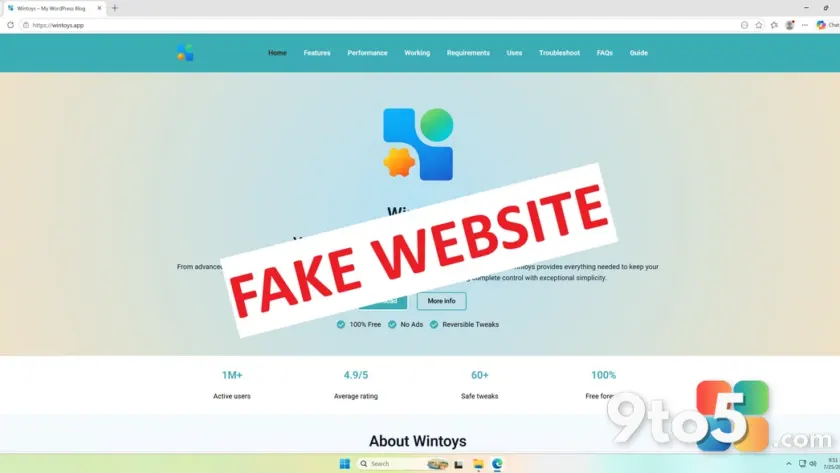
Pătrăucean habitually searches his application’s name on Google to monitor new reviews and user questions. During one of these searches, he found wintoys.app ranking prominently in the results. The site was built on WordPress, loaded with generic, inaccurate AI-generated content, and reused his older project logo. The download button initially redirected to the legitimate Microsoft Store listing, which likely explains why the domain had not triggered automated security alerts earlier.
When he attempted to trace the domain’s ownership, he ran into a wall of privacy protections. Epik Inc. bundles free WHOIS privacy into every domain it sells, which keeps the buyer’s identity hidden by default. That privacy shield made it nearly impossible to issue a direct takedown request to the registrar. Instead, Pătrăucean compiled a full inventory of the 72 impersonating domains and reported them to Cloudflare, which added a “Suspected Phishing” interstitial warning to wintoys.app in under an hour.
The Cloudflare warning is a useful stopgap, but it comes with a structural limitation. The hosting provider’s abuse form only accepts one domain per submission. Even though Pătrăucean listed all 72 domains in his initial report, the remaining 71 sites will likely continue operating without that protective layer. This bottleneck has forced developers and security researchers to rely on community-driven blocklists instead of waiting for individual takedowns.
The domains have since been added to Hagezi’s DNS blocklist, a widely adopted ad-blocking and privacy list used by millions of users. Anyone running that blocklist will now have these sites blocked at the network level before they can load in a browser. The list also includes MKVToolNix, a popular video remuxing utility that was recently added to the impersonation campaign.
The Three-Stage Playbook Behind the Fake Windows App Websites
Check Point Research published a detailed breakdown of how these impersonation networks operate, revealing a deliberate three-stage workflow designed to bypass both user skepticism and automated security filters. The first stage relies entirely on search engine optimization. Attackers register domains that exactly match the names of popular Windows utilities and invest time in building backlinks and domain authority so they outrank the legitimate project pages.
The second stage focuses on trust building. When a user first visits the site, the download button actually links to the real Microsoft Store listing or the developer’s official GitHub releases page. This deliberate good-faith behavior tricks both the visitor and any automated security crawlers into treating the domain as legitimate. Once the site accumulates enough traffic and historical reputation, the attackers execute the third stage.
The final stage swaps the trusted links for malicious payloads. Check Point found that several of these domains load a script from Amazon CloudFront that intercepts clicks on the download button. That script routes the visitor through a Traffic Distribution System, a filtering layer that evaluates the user’s geographic location, browser fingerprint, and behavior patterns to decide whether they are a casual user, a security researcher, or an automated bot. Legitimate users get served the trojanized installer, while researchers and scanners see harmless content.
The malware families deployed through this system include RemusStealer, an infostealer designed to target over 20 web browsers and cryptocurrency wallets, and AnimateClipper, which silently replaces copied crypto wallet addresses with the attacker’s own destination address. The operation is highly automated, which is why it can sustain dozens of active domains without collapsing under manual maintenance costs.
Confirmed Active Attacks: Lively Wallpaper and SignalRGB
Two developers on the affected list have publicly confirmed that their impersonators are actively distributing functional malware. A GitHub issue filed against Lively Wallpaper documents a fake site at livelywallpaper.app that serves a trojanized installer through a script hosted on giize.com. The installer bundles a legitimate DirectX setup file alongside a malicious, unsigned DLL, then installs a persistent remote-access service and bandwidth-sharing software that appears to resell the victim’s internet connection.
SignalRGB has reported a similar situation involving signalrgb.io, a domain the team says has managed to rank near the top of multiple search engines, including Bing. The developers later identified a second impersonating domain at signal-rgb.net and urged anyone who downloaded from either site to delete the file and run a full malware scan. One community member reported successfully getting a domain taken down after submitting evidence to Cloudflare, which confirmed it had restricted access to the reported URL and forwarded the abuse report to the hosting provider.
The takedown process remains a persistent headache for open-source maintainers. Mica For Everyone, a Windows theming utility, is currently being impersonated through a domain registered with Spaceship and hosted via Hetzner behind Cloudflare. The same registrar was used for the fake Lively Wallpaper and SignalRGB sites. The maintainer reported that the registrar’s abuse email went unanswered, and without a registered trademark on the application’s name, a formal legal takedown was not viable. The only available workaround was asking Cloudflare to apply a malware warning to the domain.
It remains unconfirmed whether this pattern points to a single operator spreading impersonation targets across multiple registrars to slow down takedowns, or whether several unrelated attackers are independently copying the same playbook. The consistent use of Epik Inc. for registration and Cloudflare for hosting suggests a centralized infrastructure, but the operational details have not been fully verified.
Why Windows Is a Prime Target and How to Stay Safe
This campaign is not a Windows-specific flaw, but the platform’s market position makes it a disproportionately profitable target. Windows holds a far larger share of the desktop PC market than macOS, which translates to higher search volume for utility software and a larger pool of potential victims. Years of bundled ads, promotional upsells, and bloatware in Windows 11 have also left a portion of users skeptical of the Microsoft Store, pushing them to search for direct download links instead.
Microsoft’s built-in security stack has improved significantly in recent years, which does provide a baseline of protection. Windows Security runs Microsoft Defender Antivirus, SmartScreen, Smart App Control, ransomware mitigation, and cloud-delivered protection as a single integrated layer. Smart App Control can block unsigned or unrecognized executables from running, which directly interferes with the trojanized installers used in this campaign. SmartScreen also evaluates the reputation of files and URLs in real time as they are downloaded.
For developers, the rise of AI coding assistants like Claude Code and Codex has drastically lowered the barrier to building software. More developers means more applications, which in turn means a larger attack surface for impersonation campaigns. Microsoft dropped its one-time developer registration fee for individual accounts in 2025 and extended the same change to company accounts in May 2026, removing what used to be a $19 to $99 barrier. Listing an application on the Microsoft Store remains the most effective defense, as it centralizes distribution and activates Microsoft’s review and reporting systems.
What This Means for You
If you regularly download Windows utilities directly from the web rather than through the Microsoft Store, your search results are now a potential attack vector. The fact that these impersonation domains are outranking official project pages means even well-intentioned users can land on a malicious site without realizing it. The three-stage trust-building approach is specifically designed to bypass both human caution and automated security tools, which means relying solely on Windows Defender is not enough. You need to verify the source before clicking download, especially for tools that require system-level access.
How to Download Windows Apps Safely
- Always verify the domain in your address bar before downloading anything, particularly if you arrived via a Google search result.
- Prioritize the Microsoft Store or the developer’s official GitHub releases page over standalone project websites when both are available.
- Scan any installer from an unverified source with VirusTotal before executing it, keeping in mind that no scanner is completely infallible.
- Check whether a file is digitally signed by right-clicking it, opening Properties, and reviewing the Digital Signatures tab.
- Run a full scan with Windows Security or a trusted third-party antivirus if you suspect you downloaded from one of the listed impersonation domains.
The campaign highlights a broader shift in how open-source and utility software is distributed. As AI tools make development faster and cheaper, the volume of available applications will continue to grow, and so will the incentive for attackers to impersonate them. Verifying sources before installation is no longer a best practice, it is a baseline requirement for anyone running Windows.
Source: Windows Latest
Over to you: Have you ever landed on a lookalike software site through a search result, and what tipped you off that it was fake?
You may also like
 I Ditched Microsoft Editor for Copilot and Gemini After a Month of Testing
 Microsoft Unveils Project Perception, a New AI-Powered Cyber Stack for the Agentic Age
 Xbox Owners Now Get Free PC Copies of Select Ubisoft Games via Ubisoft Connect PC
 Nvidia, Microsoft, and Palantir Launch AI Safety Alliance as OpenAI and Anthropic Stay Away