When Microsoft shipped Windows 11, it replaced the legacy Movie Maker ecosystem with a first-party solution: Clipchamp. According to Thurrott’s Windows 11 Field Guide, the application is a free and surprisingly full-featured video editor designed to meet the needs of general users. Rather than relying on a third-party vendor, Microsoft integrated a browser-based creative suite directly into the operating system, marking a significant shift in how everyday users approach digital media creation.
What Is Clipchamp?
Clipchamp was originally an independent Australian startup that built a web-based video editor focused on simplicity and cloud storage. Microsoft acquired the company in late 2021, with the integration rolling out gradually throughout 2022. The goal was to provide a native, zero-install video editing experience that could compete with the basic functionality of professional suites without the steep learning curve.
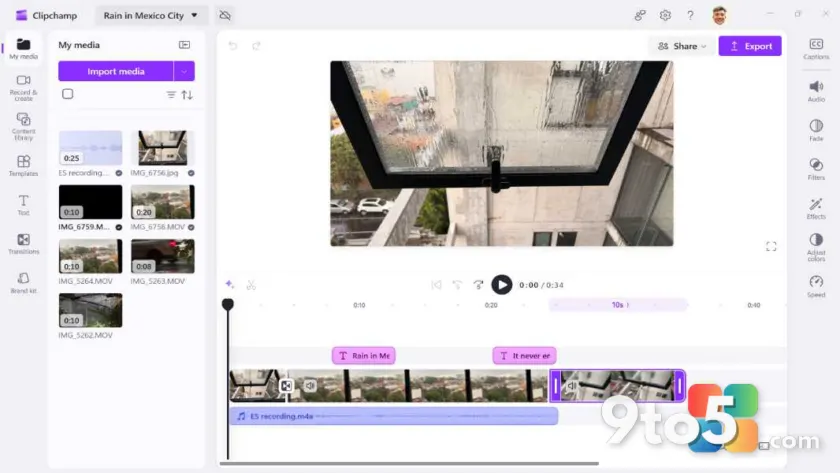
In practice, the application runs as a native Windows 11 app but retains its web architecture. This means it leverages cloud processing for rendering, which can speed up export times on lower-end hardware, though it does require an active internet connection for full functionality. The interface is built around a familiar three-panel layout: a media library on the left, a preview window in the center, and a properties panel on the right, all sitting above a multi-track timeline.
Key Features and Capabilities
The editor provides a robust set of tools that go well beyond basic trimming. Users get access to a template library for quick social media videos, a text-to-speech engine for voiceovers, and a built-in screen recorder for tutorials or gameplay clips. The media library supports common formats, including MP4, MOV, and WAV, while the timeline allows for precise cutting, splitting, and layering of video and audio tracks.
Export options are straightforward, with 1080p resolution available at no cost. While earlier versions of the tool locked 4K and certain premium templates behind a subscription wall, Microsoft has steadily expanded the free tier to reduce friction for casual creators. The cloud-based nature of the app also means projects are saved automatically, allowing you to switch between your desktop and a web browser without losing progress.
Who Should Use Clipchamp?
This tool is explicitly designed for users who need to produce content quickly without mastering professional-grade software. If your workflow involves creating YouTube intros, marketing clips, school presentations, or personal video messages, Clipchamp provides the necessary toolkit without requiring a subscription to Adobe Premiere or DaVinci Resolve.
For professional editors, the application lacks advanced color grading, keyframing, and audio mixing capabilities. However, for the vast majority of Windows 11 owners, the balance of ease-of-use and functionality hits a sweet spot. Microsoft confirmed the tool’s availability and core feature set via its official Windows blog, positioning it as the default creative solution for the modern PC.
What This Means for You
The integration of Clipchamp into Windows 11 effectively ends the era of searching for safe, free video editing software. You no longer need to worry about bundling, outdated codecs, or incompatible plugins. The app is pre-installed on most new devices, meaning you can open it directly from the Start menu and begin editing within seconds. This also reduces the storage footprint on your system, as you are not juggling multiple heavy creative applications.
From a workflow perspective, the cloud-synced project files mean your edits follow you across devices. If you start a project on your desktop and need to make a quick adjustment on a laptop, you can log into the Clipchamp web portal and continue where you left off. This flexibility is particularly useful for remote workers and students who switch between machines.
How to Get It
On most Windows 11 systems, Clipchamp is already installed. You can launch it by typing “Clipchamp” into the Start menu search bar or by navigating to Settings > System > Video editor. If the app is missing, you can download it directly from the Microsoft Store by searching for “Clipchamp” and clicking the install button. The process is entirely free, and you will be prompted to sign in with your Microsoft account to save projects to the cloud.
Once opened, you can choose between creating a new video from scratch or selecting a pre-made template. The template section is organized by use case, including social media, business, and education, which helps streamline the initial setup. After importing your media, drag clips onto the timeline, apply transitions, add background music from the licensed library, and export when ready.
Whether you are a casual user or a small business owner, having a capable video editor built directly into your operating system removes a major barrier to content creation. Clipchamp delivers exactly what most people need: speed, simplicity, and reliable performance without the overhead of professional software.
Source: Thurrott.com
Over to you: Do you rely on Clipchamp for your quick edits, or do you prefer a dedicated third-party editor for your projects?
You may also like
 Microsoft Admits WinUI Native Apps Hog RAM, Promises Performance Boost Before Start Menu Rewrite
 Windows 11 26H2 Update: Movable Taskbar, Smarter Search, and More Start Menu Control
 10 Underrated Windows 11 Features That Actually Change Your Daily Workflow
 Microsoft Finally Lets You Remap the Copilot Key in Windows 11