Microsoft is significantly changing how Windows Update handles interruptions and restarts. The latest changes introduce a calendar-based interface for pausing updates, allow users to effectively pause updates indefinitely by chaining extensions, and consolidate multiple update types into a single monthly reboot.
#1 Calendar-based pause replaces fixed increments
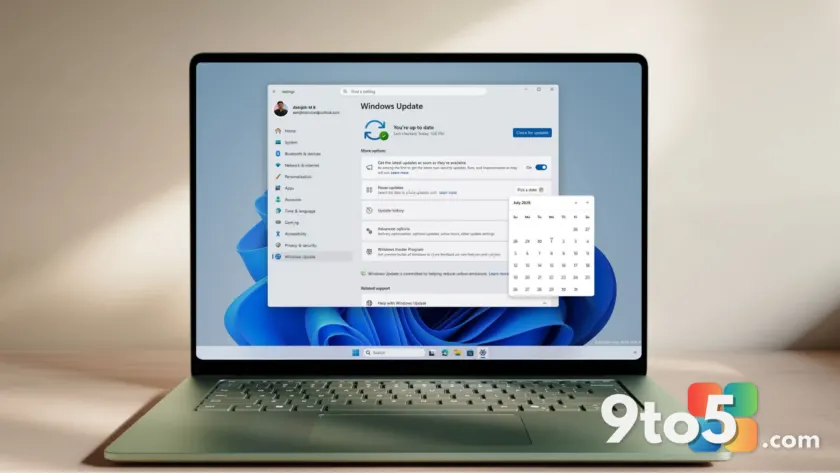
The traditional method of pausing Windows updates relied on a dropdown menu with fixed timeframes, typically offering options like one week or four weeks. Microsoft has replaced this with a calendar view in Settings > Windows Update. You can now select a specific end date for your pause, making it easier to align the block with travel dates or busy work periods.
The maximum pause duration remains capped at 35 days from the current date. However, the visual calendar makes it much clearer exactly when updates will resume, removing the need to mentally calculate weeks.
#2 How to pause updates indefinitely
While Microsoft states that the pause is not a permanent solution for avoiding updates, users can effectively block them indefinitely. As you approach the end of your 35-day window, you can simply extend the pause again using the same calendar interface.
This process allows you to reset the clock repeatedly. While this gives you total control over when updates install, it is worth noting that delaying security patches carries inherent risks. When a pause does expire, Windows will immediately check for, download, and install any pending updates.
#3 Single monthly restart for drivers and firmware
One of the most frustrating aspects of Windows updates has been multiple reboots required to install different components like drivers, .NET frameworks, and firmware. Microsoft is now coordinating these elements to align with the monthly quality update.
This means retail users will experience a single restart per month for all cumulative updates. Windows Insiders in the Experimental and Beta channels will still receive more frequent updates, but the consolidation aims to reduce disruption for general users. You can view exactly what is being installed by expanding the update list in Settings.
#4 ‘Update and shut down’ behavior fixed
Microsoft has also addressed a long-standing issue where selecting ‘Shut down’ would sometimes trigger an update installation instead of powering off. This behavior, which frustrated users for years, is now corrected in recent builds.
The Power menu will consistently show standard Restart and Shut down options. Clicking Shut down will now strictly power off the PC without silently installing pending updates first. This fix was confirmed in Build 26300.8289 and ensures that your shutdown command is respected.
Availability and what this means for you
The calendar pause feature is currently available via the June optional update KB5095093. The single monthly restart consolidation and the Power menu fix are rolling out to Windows Insiders in the Experimental and Beta channels first, with retail availability to follow.
For everyday users, these changes mean greater predictability. You can now plan around updates with precise dates rather than vague timeframes, and you won’t be surprised by multiple reboots or unexpected installations when shutting down your PC.
Source: Windows Latest
Build details:
- kb5095093
Over to you: Will you use the new calendar pause to avoid updates during busy weeks, or stick to automatic installation?