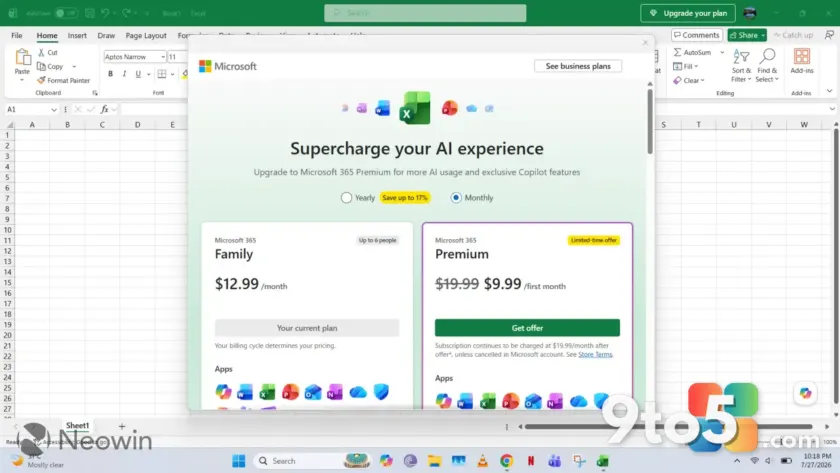
Microsoft is drawing fresh backlash after rolling out a persistent “Upgrade your plan” banner to Word, Excel, and PowerPoint, even for paying Microsoft 365 subscribers. The update has sparked widespread frustration across social media and tech forums, with users calling the move intrusive and counterproductive. According to reports from Neowin, the new overlay appears at the top of the application window and refuses to disappear, forcing users to interact with it or watch it block their workspace.
For years, Microsoft has balanced free and paid tiers through gentle nudges and feature gating. This latest rollout, however, crosses a line for many by targeting active subscribers who are already paying for the service. The company has not issued an official statement addressing the timing or rationale behind the change, leaving users to piece together what triggered the sudden shift in strategy.
The Persistent In-App Ads Explained
The banner in question displays a prominent call-to-action urging users to upgrade their subscription tier. Unlike previous prompts that appeared only when accessing premium features, this overlay is now fixed to the interface. It sits directly above the ribbon, often obscuring the first few rows of a spreadsheet or the top of a document. Users report that the “Dismiss” or “X” button is either missing, non-functional, or hidden behind other UI elements, making it nearly impossible to close.
This behavior marks a significant departure from Microsoft’s traditional approach to upselling. Historically, the software giant relied on contextual prompts that triggered only when a user attempted to use a feature reserved for higher-tier plans. Those messages were designed to inform rather than interrupt. The current implementation, however, functions more like a digital billboard than a helpful notification, drawing comparisons to ad-supported models used in mobile gaming and freemium apps.
The impact is particularly noticeable for professionals who rely on these tools for daily workflows. Accountants, writers, and project managers have taken to forums to share screenshots of the banner blocking critical data. Some note that the overlay shifts position depending on window size, but it consistently intrudes on the primary working area. The lack of an opt-out mechanism has turned what should be a routine update into a usability headache.
Impact on Subscribers
Perhaps the most contentious aspect of this rollout is its effect on paying customers. Microsoft 365 subscribers pay a recurring fee specifically to avoid the limitations and prompts that plague free users. Seeing the same upgrade messaging that free-tier users encounter undermines the value proposition of the subscription. It creates a confusing experience where paying customers are treated as potential upgraders rather than existing clients.
From a product design perspective, this move raises questions about Microsoft’s internal metrics. The company may be testing conversion rates or responding to pressure to increase average revenue per user. However, the execution appears to prioritize short-term metrics over long-term customer satisfaction. In practice, this means that even loyal subscribers are now subjected to friction that they previously paid to remove.
The timing of the update also invites speculation. With the broader tech industry shifting toward ad-supported models for hardware and software alike, Microsoft may be laying groundwork for a new revenue stream. Yet, applying this model to a productivity suite used by enterprises and individuals alike feels premature. The backlash suggests that users are not ready to accept advertising in tools they depend on for income and organization.
What This Means for You
If you are currently using Word, Excel, or PowerPoint and notice the upgrade banner, your subscription status is likely unaffected. Microsoft has not indicated that the banner is tied to account verification failures or payment issues. Instead, it appears to be a blanket rollout applied to all accounts regardless of tier. This means you are not being penalized for an expired payment or a misconfigured license.
However, the presence of the banner does signal a shift in how Microsoft views its user base. If you rely on these applications for work, expect similar prompts to appear in other Microsoft 365 apps in the near future. The company is clearly testing the boundaries of in-application monetization. Users who prefer a clean interface may need to adapt to a new normal where productivity tools include promotional elements.
For those managing fleets of devices in an enterprise environment, this update could complicate deployment and support. IT administrators will need to monitor user feedback and potentially prepare communication templates to address the confusion. The lack of a Group Policy option to suppress the banner means that even organizational deployments are subject to the same intrusive prompts.
How to Get It and What to Do
The persistent in-app ads are currently rolling out via standard Microsoft 365 updates. You cannot opt in or out through the settings menu. If you are seeing the banner, it means your installation has received the latest update package. Microsoft has not provided a rollback option or a temporary disable switch for the overlay.
In the meantime, users can mitigate the distraction by maximizing the application window to full screen. While the banner remains visible, it will no longer shift or resize as you adjust the window dimensions. Some users have also reported that switching to the dark theme makes the banner slightly less visually dominant, though it remains fully functional and clickable.
Microsoft typically monitors community response closely before making permanent changes to interface elements. If the backlash continues to grow, the company may revert the banner or introduce an option to hide it. For now, the best course of action is to document the issue through the in-app feedback tool and report it via the Microsoft Support community. Widespread user reports often accelerate the development of workarounds or policy updates.
Source: Neowin
Over to you: Are you seeing the “Upgrade your plan” banner in your Office apps, and does it impact your workflow?
You may also like
 Free Ubisoft Xbox PC Games Now Available for Xbox Console Owners
 Microsoft Unveils MAI-Cyber-1-Flash and Project Perception to Challenge Anthropic in Cybersecurity
 70+ Fake Windows App Websites Are Distributing Malware via Google Search
 I Ditched Microsoft Editor for Copilot and Gemini After a Month of Testing