Summer heatwaves are rapidly becoming a genuine obstacle for PC gamers, turning home offices into thermal traps just when you want to push your hardware the hardest. According to a recent report by the BBC, record-breaking heat domes across the UK and Europe have pushed temperatures past 40°C (104°F), creating conditions that most residential buildings were never designed to handle. For those of us gaming in poorly ventilated rooms, the combination of ambient heat and GPU/CPU exhaust creates a feedback loop that throttles performance and shortens component lifespans. Enter a viral Reddit build that tackles this exact problem with a remarkably straightforward engineering approach.
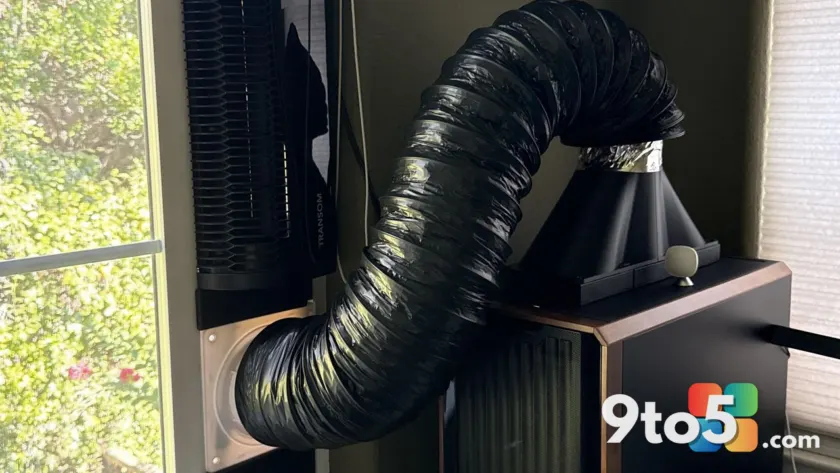
Reddit user scvready0808 took to r/pcmasterrace to share a homemade “DIY PC chimney” that routes a desktop’s hot exhaust air directly through a window and outside. Rather than relying on expensive cooling upgrades or moving the rig to a climate-controlled space, the setup uses a series of insulated flexible pipes, connector kits, and a standard window fan to create a continuous exhaust pathway. The result is a functional ventilation system that actively pulls heat away from the gaming zone, making it significantly more tolerable to run demanding titles even during peak summer temperatures.
How the DIY PC Chimney Works
The core concept relies on basic thermodynamics: hot air rises, and forced airflow can override natural convection to move that heat out of a confined space. The build starts by removing the side panel of the PC case, which allows the internal fans to push exhaust air directly into a large-diameter insulated flexible duct. This type of piping is commonly used in HVAC systems and dryer vents, chosen here specifically for its thermal resistance and ability to maintain a sealed connection without conductive heat loss.
The duct is then routed through a custom or off-the-shelf connector kit that bridges the gap between the case opening and a window frame. At the window end, a standard exhaust fan is mounted to pull the air through the pipe and expel it outdoors. The combination of the PC’s internal case fans and the external window fan creates a pressure differential that ensures a steady flow of air, effectively turning the desktop into a localized blower that vents its own waste heat outside the room.
The components listed by the creator include Etsy-sourced duct adapters, which likely provide the necessary sealing gaskets and clamps to prevent air leaks, along with the insulated piping and connector hardware. While the setup looks utilitarian and somewhat makeshift, the underlying principle is identical to how server rooms and industrial workspaces manage thermal loads: isolate the heat source and force-exhaust it to a cooler environment.
What This Means for You
For gamers operating in older brick homes or apartments without central air conditioning, this approach offers a low-cost alternative to traditional cooling methods. Standard PC cases are designed to pull cool air from the front or bottom and exhaust it out the back, but that cycle only works efficiently if the intake air is already relatively cool. When ambient room temperatures exceed 30°C (86°F), the intake air warms up inside the case, forcing the cooling system to work harder while struggling to shed heat into an already saturated environment.
By bypassing the room’s ambient air entirely, the DIY PC chimney decouples your hardware’s thermal management from the weather outside. This means sustained boost clocks on your GPU, lower thermal throttling events, and quieter operation as fans don’t need to spin at maximum RPM to compensate for poor airflow. It also addresses a growing concern for hardware longevity, as consistent exposure to high ambient temperatures accelerates electrolyte degradation in capacitors and increases thermal stress on solder joints over time.
Of course, the setup isn’t a universal fix. It requires a window that can accommodate an exhaust fan and duct run, and it does generate some audible noise from the external fan and moving air through the piping. For those in rented spaces or ground-floor units without easy window access, the installation constraints may limit its practicality. Additionally, the build relies on the PC case being positioned close to the window, which may not align with every desk layout.
What to Do If Your Room Overheats
If you are currently gaming in sweltering conditions and looking for immediate relief, there are several steps you can take before attempting a full ducting build. First, ensure your PC case intake filters are clean; dust buildup restricts airflow and forces fans to work harder in already warm conditions. Second, consider repositioning your desk so the PC pulls air from a cooler part of the room, away from direct sunlight or heat-generating appliances.
For those who cannot modify their window setup, alternative strategies include using a dedicated desk fan to blow cool air directly onto the PC’s intake grille, or temporarily relocating high-performance gaming to handheld devices like the Xbox Ally or cloud streaming services, which draw significantly less power and generate minimal waste heat. Microsoft confirmed via the Windows Insider Blog that thermal management and power efficiency remain top priorities for upcoming hardware iterations, signaling that manufacturers are already designing around these real-world environmental constraints.
Until then, the DIY PC chimney stands out as a clever, physics-backed solution that turns a common summer frustration into a manageable engineering project. It highlights how straightforward modifications to existing hardware can bridge the gap between ideal cooling conditions and the reality of hot, poorly ventilated living spaces.
The trend of repurposing HVAC and industrial ventilation parts for consumer electronics continues to gain traction among enthusiast builders. If you have a spare window, a few hours of weekend time, and a desktop that runs hot, this approach might just be the most practical way to keep your rig—and your sanity—cool when the mercury rises.
Source: Latest from Windows Central
Over to you: Are you running a custom cooling setup this summer, or have you switched to handhelds to keep your room temperature down?