Microsoft is changing the WebView2 release cadence, accelerating the pace at which its WebView2 Runtime receives updates. According to an announcement on the Microsoft Edge Developer Blog, the Runtime is moving to a two-week release cycle, aligning with the faster schedule Microsoft Edge adopted earlier this year.
This means apps built on WebView2 will see new major versions land roughly twice as often as before, delivering security fixes and platform improvements to users sooner. Here is exactly what is changing and when.
WebView2 release cadence explained
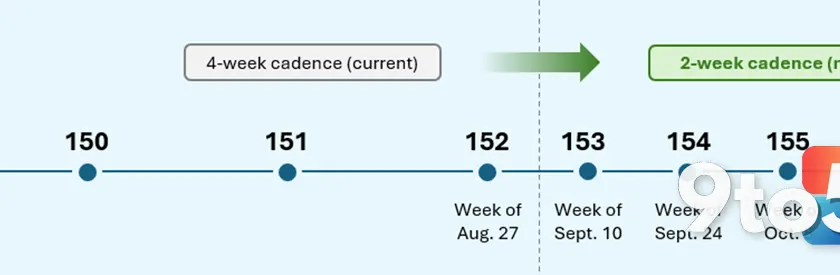
Until now, the WebView2 Runtime shipped a new major version every four weeks. Starting with version 152, that interval is being cut in half to about two weeks, matching Edge’s new major-release cadence.
The motivation, per Microsoft, is straightforward: faster delivery of security fixes, platform improvements, and new capabilities. With the web platform evolving quickly and vulnerabilities being patched regularly, a shorter cycle reduces the window during which apps run on outdated, less-secure builds.
The WebView2 SDK release cadence is changing too. Instead of fixed monthly SDK releases, SDK versions will now ship whenever there is something new to share — new features, bug fixes, security updates, and other improvements. When an SDK does go out, it will land on the same date as its corresponding Runtime release, keeping the two in lockstep.
The timeline: versions 152 and 153
Microsoft has pinned down the transition with two specific milestones:
- During the week of August 27, WebView2 Runtime version 152 will be the last major version released four weeks after the previous version.
- During the week of September 10, version 153 will be the first version released just two weeks after the previous one.
- From that point on, a new major version will arrive roughly every two weeks, aligned with Edge’s release cadence.
So the very last four-week gap is the one leading up to version 152, and the first two-week gap is the one leading up to version 153. The shift is a hard cutoff, not a gradual ramp.
What this means for your app
How the change affects you depends on which distribution mode your app uses.
If you use the Evergreen Runtime distribution mode — which is the default — there is nothing you need to do. Your users’ machines will begin receiving security and platform fixes at the more frequent cadence automatically. The runtime self-updates in the background, so the faster cycle simply means users get newer, safer builds without any action on your part.
If you ship a Fixed Version Runtime instead, you retain control over when you update, but new major versions will arrive more often. That puts more responsibility on you to validate and adopt new versions more frequently, so your app does not fall behind on security fixes. The Fixed Version mode is designed for scenarios where you need a pinned runtime version, but the trade-off is that you are responsible for keeping it current.
What to do as a developer
Microsoft laid out a few recommended actions to help developers keep up with the faster pace.
First, test your WebView2 app using the Beta preview channel of Microsoft Edge. This lets you catch app-specific bugs before they roll out to users on the Stable channel. Early testing is the most reliable way to surface issues unique to your app before the wider public hits them.
Second, consider automating validation of your app’s core workflows using the WebView2 preview channels. You can run automated tests through Microsoft Edge WebDriver, which is useful given how frequently versions are now shipping — manual testing across every release is not practical.
Finally, report regressions early so the WebView2 team can address them before the Stable release. Bugs can be reported through the WebView2Feedback GitHub repository, giving the team a chance to fix issues before they reach the general public.
What this means for you
For everyday Windows users, the practical upshot is simple: apps that embed WebView2 — including built-in parts of many Windows programs and third-party software — will get security and platform updates more regularly. You will not need to do anything to receive these fixes if those apps use the default Evergreen mode.
The one caveat is that if a particular app pins itself to an older, Fixed Version runtime, it may lag behind on the newest fixes until its developer updates it. Most mainstream apps use Evergreen, so the impact should be minimal for most users.
How to get it
For most users, there is nothing to install — the faster cadence applies automatically to Evergreen Runtime apps. If you are a developer, keep an eye on the WebView2 release notes and the Edge release schedule for version specifics, and use the preview channels to test ahead of Stable.
For more details, Microsoft points developers to the WebView2Announcements discussion, the runtime release notes, and the official Edge release schedule, and invites feedback through the WebView2Feedback repository.
Source: Windows Blog
Over to you: Are you using the Evergreen or Fixed Version runtime, and will the faster update cycle make it harder to keep your app current?