Phishing scams have undergone a dramatic transformation in recent years. The days of poorly written emails with obvious typos and suspicious attachments are largely over. Today’s threats leverage generative AI to craft linguistically flawless messages that mimic the tone, structure, and formatting of legitimate communications from Microsoft, your bank, or your favorite delivery service. Beyond the text, the technical execution has grown more sophisticated. Attackers are now deploying tactics that can circumvent two-factor authentication, exploit trusted cloud platforms, and even use physical mail to steal identities. If you rely on Windows for work or personal use, understanding these evolving threats is no longer optional—it is a critical part of your digital hygiene.
#1 The Microsoft 365 OAuth Device Code Flow Trap
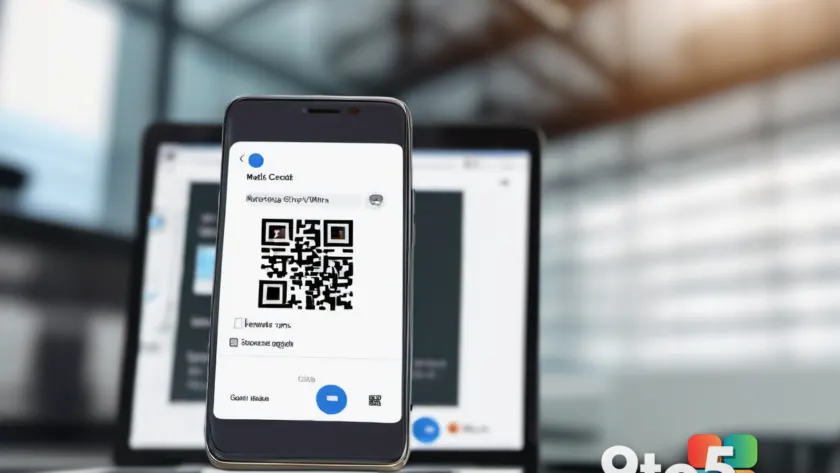
One of the most technically advanced phishing scams currently in circulation targets Microsoft 365 accounts by exploiting a legitimate authentication protocol. Attackers use the OAuth 2.0 Device Authorization Grant, a standard procedure designed for devices that lack a full browser or easy text input, such as smart TVs, IoT gadgets, and command-line tools. In this attack, you receive a message claiming your session has expired and needs re-authorization. The link often hides behind a QR code to bypass spam filters and push you toward your smartphone.
When you scan the code, you are not taken to a fake site. Instead, you are routed to the genuine Microsoft authentication page for devices. You enter your credentials and complete the multi-factor authentication process, believing you are logging into your own device. In reality, you are authorizing a malicious application controlled by the attacker. Once authorized, they receive an access token that grants them API access to your account without ever needing your password again. Security researchers at Proofpoint have published a detailed breakdown of this campaign, noting how it effectively renders traditional MFA useless against this specific vector.
The use of QR codes is a deliberate psychological and technical choice. It forces you to switch from a PC, where you might notice URL discrepancies, to a smaller smartphone screen where security software is often less robust. The combination of a legitimate Microsoft login page and a QR code creates a false sense of security that is incredibly difficult to break without technical context.
#2 The Support Scam: Impersonating Signal and Microsoft
Support scams remain a persistent and highly effective threat, recently highlighted by a high-profile incident involving Julia Klöckner, the president of the German Bundestag. In this variant, attackers posing as Signal support staff contacted her via the messaging app itself. Under the guise of verifying her account, they requested her PIN, which granted them full access to her Signal account and private communications. German security agencies, including the BSI, have since published official guides to help users verify if their accounts have been compromised.
For Windows users, the classic Microsoft support scam continues to thrive. Fraudsters contact victims via telephone, email, or browser pop-ups, claiming your PC is locked or infected with malware. They urge you to install remote desktop software or a “security tool” to fix the issue. Once installed, this software gives the attacker full control over your system. The psychological trigger here is urgency combined with authority. You are told that immediate action is required to prevent data loss, pushing you to bypass normal caution.
These attacks often rely on the victim’s lack of technical knowledge. By pretending to be a helpful technician, the attacker positions themselves as the solution to a fabricated problem. The result is not just data theft, but complete system compromise, allowing attackers to install additional malware, steal files, or use your machine for further attacks.
#3 Fake Microsoft Defender Warnings
Microsoft Defender is a built-in antivirus feature included free with Windows. Because it is native to the operating system, a warning from Defender carries significant weight and triggers immediate alarm. Cybercriminals know this and frequently spoof these notifications. You might receive an email or encounter a browser pop-up claiming that Defender protection has expired and must be renewed for a fee.
These fake warnings are designed to look identical to the real Defender interface, complete with official logos and warning icons. They redirect you to counterfeit online stores where you are asked to pay for “virus protection” that does not exist. The primary goal is financial fraud, but the secondary goal is often malware installation. Clicking the link or downloading the supposed update can infect your system with ransomware or spyware.
Remember that Microsoft Defender is always free and built into Windows. No payment is ever required. If you receive a suspicious email, delete it immediately. If a pop-up appears in your browser, close the window using the Alt + F4 shortcut or force-close the browser. For persistent pop-ups that cannot be closed, antivirus specialists at Norton have published step-by-step removal guides to help you clear the infection from your system.
#4 OneDrive Cloud Phishing via Shared Files
Cloud storage services like Microsoft OneDrive are deeply integrated into daily Windows workflows, making them a prime target for phishing scams. Instead of traditional attachments, attackers send sharing notifications with subject lines like “Document shared with you.” The files appear to be work-related invoices, project plans, or pay slips, making them difficult to ignore.
The insidious nature of this attack lies in its hybrid approach. Some campaigns use legitimate cloud platforms to host manipulated documents that contain malicious links or scripts. Others create convincing fake sharing interfaces that mimic the OneDrive web experience. The objective is to harvest your login credentials for your cloud and email accounts. Once attackers gain access, they can use your trusted identity to launch further phishing attacks against your contacts, who are far more likely to click a link from someone they know.
This vector exploits the trust we place in cloud collaboration tools. Because the notification comes from a service you use daily, your guard is down. The request to view a “shared file” feels routine rather than suspicious. Always verify the sender’s identity through a separate communication channel before opening unexpected cloud shares, especially if the file prompts you to log in or enter personal information.
#5 Sophisticated Delivery Service Scams
Parcel delivery phishing scams are among the most persistent threats because they align perfectly with modern consumer habits. Almost everyone expects regular deliveries, making us naturally less suspicious of notifications about packages. Today’s variants go far beyond simple text links. They feature fully dynamic tracking systems that simulate real logistics processes, complete with realistic delivery statuses and driver information.
These fake tracking pages create a sense of urgency with messages like “Delivery failed – please confirm address” or “Last chance to reschedule.” The design mimics major carriers so closely that even careful users can be fooled. The attack typically escalates by asking you to update your customer account with personal details or pay a small fee for express delivery or customs duties.
The financial impact can be severe. Victims often end up revealing login details for online shopping accounts or transferring money directly to the attackers. The combination of a familiar context, realistic visuals, and time pressure makes these scams particularly dangerous. Always verify delivery status directly through the carrier’s official website or app, rather than clicking links in emails or messages.
#6 Online Banking Phishing Campaigns
Phishing scams targeting online banking have existed almost as long as digital banking itself, but the scale and sophistication have increased dramatically. Recent campaigns have targeted customers of major financial institutions with messages claiming urgent account verification is required. For example, emails have been sent claiming to be from Easybank, Commerzbank, Deutsche Bank, and DKB, demanding confirmation of mobile numbers or reactivation of security certificates.
These messages often use threatening language to prompt immediate action, warning that you will lose access to your account if you do not respond by the next working day. The links lead to counterfeit banking portals that capture your login credentials and TAN codes. Because banking apps and websites are part of your daily routine, the cognitive load required to verify a message is low, making you more vulnerable to these deceptive requests.
Consumer protection agencies have issued warnings about these specific campaigns, noting the rapid evolution of the templates used. If you receive a message from your bank, never click the embedded links. Instead, open your browser, navigate directly to your bank’s official website, and log in to check for any legitimate notifications. If in doubt, call your bank using the number on the back of your debit card.
#7 Credit Fraud via Physical Mail and Postident
Not all phishing scams happen online. A particularly dangerous variant reaches you through your physical mailbox, claiming to be from your bank and requesting you to verify your identity via the Postident procedure. Postident is a legitimate service provided by postal services that allows you to verify your identity to third parties, such as new banks or credit institutions.
Attackers obtain your personal details—address, main bank, employer, income—through data breaches or fake property listings. They then send a forged letter that looks official, asking you to confirm your details to “update your account.” In reality, you are authorizing a large loan in the attacker’s name. Losses in these cases can range from $15,000 to $25,000, and recovering the funds is often difficult.
This attack exploits the assumption that physical mail from a bank is inherently trustworthy. The use of a recognized verification procedure adds a layer of legitimacy that is hard to question. Always be cautious when receiving Postident requests, especially if you have not initiated the process yourself. Contact your bank directly to verify the request before proceeding.
What This Means for You
The evolution of phishing scams means that traditional red flags are no longer reliable. You cannot rely on spotting bad grammar or obvious spoofing. Instead, you must adopt a verification-first mindset. This means treating every unsolicited request for credentials, payment, or personal data as suspicious until proven otherwise. The integration of AI and legitimate authentication protocols has raised the bar for attackers, but it also means that security tools and browser protections are more important than ever.
For Windows users, this also highlights the importance of keeping your system updated. Microsoft regularly releases patches that improve Defender’s ability to detect and block malicious URLs and phishing sites. Enabling multi-factor authentication, preferably using passkeys, adds a critical layer of security that is harder to bypass than SMS-based codes. Your password manager can also serve as an early warning system, refusing to autofill credentials on domains that do not match your saved entries.
How to Protect Yourself from Phishing Scams
Defending against modern phishing scams requires a combination of vigilance, technical safeguards, and healthy skepticism. Start by recognizing the common characteristics of fraudulent messages: unsolicited contact regarding financial matters, artificial time pressure, suspicious links hidden behind QR codes, and requests for sensitive information. If a message exhibits these traits, do not engage with it directly.
Implement the following protective measures immediately. First, disable automatic link previewing in your email client to prevent malicious scripts from executing. Second, use a password manager that warns you when a site’s domain does not match your saved credentials. Third, enable multi-factor authentication on all critical accounts, prioritizing app-based or hardware keys over SMS. Fourth, configure your browser to block pop-ups and restrict third-party cookies, reducing the attack surface for drive-by downloads.
Finally, educate yourself and your household on these tactics. Phishing scams often target family members or colleagues to expand the attack network. Share knowledge about current threats, establish a protocol for verifying unexpected requests, and encourage the use of official channels for all financial and account-related communications. By combining technical controls with informed behavior, you significantly reduce your risk of falling victim to these sophisticated attacks.
Source: PCWorld
Over to you: Which of these phishing scams have you encountered most often in your inbox or mailbox?
You may also like
 Gears of War E-Day Beta Dates Revealed: How to Enter and What to Expect
 Mastering AI Workplace Productivity: How to Beat Workload Creep, AI Slop, and Career Anxiety
 Gears of War: E-Day Early Access Beta Launches August 6 with Two Multiplayer Tests
 Microsoft Pays Record $20 Million in Bug Bounty Awards, Cites AI Surge