Microsoft is giving developers a machine that is ready to code the moment you unbox it, and the initiative is called Project Zenith. Announced on the Windows Blog, it is a preconfigured, distraction-free Windows 11 experience built specifically for developer-class hardware, designed to pair cutting-edge silicon with a setup tuned for development so you can start building without spending hours configuring your environment.
Here is everything we know about the new program and what it means for developers.
What Project Zenith actually is
Project Zenith is not a new version of Windows or a separate operating system. It is a curated, ready-to-code configuration that runs on a specific class of powerful developer devices, bringing together work that has been happening across the Windows platform into a single tailored experience.
The hardware bar is deliberately high. Microsoft says these devices will feature 64 GB or more of unified memory and 250+ GB/s of memory bandwidth. Those numbers are not arbitrary — they are what you need to run large local AI models without waiting on cloud queues or paying per token.
According to Microsoft, Project Zenith will first become available with AMD’s Ryzen AI Halo, with more devices from its OEM and silicon partners arriving in the coming months. That means the experience should expand across multiple makers and performance tiers over time, though the company insists the ready-to-code promise stays consistent regardless of which device you buy.
Ready to code out of the box
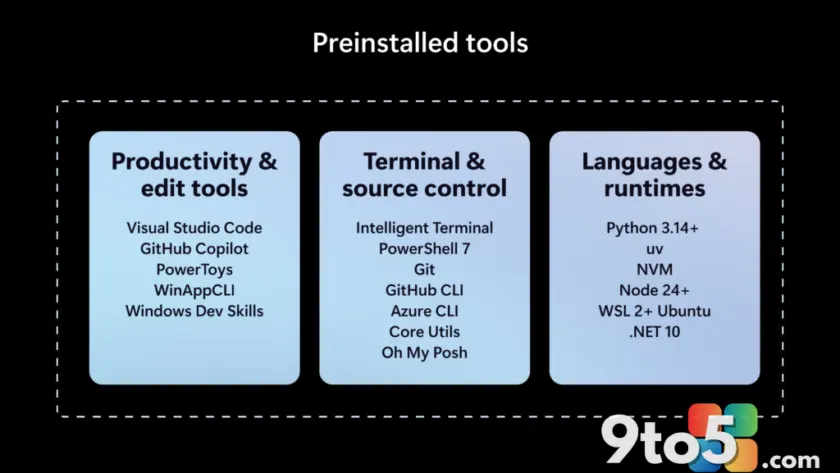
The headline feature is that Project Zenith ships with a set of pre-installed tools spanning languages and runtimes, source control, and productivity software. To keep your favorites within reach, Windows Terminal and Visual Studio Code are pinned to the Taskbar by default.
Microsoft has also pre-configured Windows Settings for coding across four areas: File Explorer, Search, Start, and the Taskbar. In File Explorer, the setup enables file extensions, hidden files, the full path in the title bar, and the details pane, with long-path support turned on. At the same time, recently used files and folders and sync provider tips are switched off to keep the workspace clean.
Within Search and Start, the Command Palette is enabled, while Start menu tips and account notifications are disabled to cut down on distractions. The company is careful to note this is not about forcing a single workflow. You can still configure, extend, and personalize your environment around your preferred tools, languages, and frameworks. The idea is simply to start from a better baseline — one shaped by the settings and tools developers reach for first.
This builds on a year of Windows developer investments, from WSL and Windows Developer Configurations to the Intelligent Terminal and expanded on-device AI capabilities, each aimed at helping developers stay in control and build faster.

Running local AI models, unmetered
One of the most practical benefits is the ability to run 30B+ parameter models locally and unmetered. For developers experimenting with AI, that accelerates testing while reducing reliance on metered cloud tokens, which can add up quickly as you iterate.
This ties into a broader push Microsoft outlined at Build 2026, where it described Windows evolving into an open platform for secure agentic experiences. As AI models grow more powerful, agentic coding workflows demand continuous compute. By shifting some of that intelligence to the edge, Microsoft argues it can improve token economics and transform the developer experience: frontier models tackle frontier problems, while everything else runs locally at scale.
A secure foundation for agents
Agentic applications are becoming more common, and they need a secure foundation to build and run on. Microsoft says Project Zenith devices will benefit from platform investments made since Build 2026, including OS-enforced identity, containment with Microsoft Execution Containers (MXC), and enterprise-grade manageability for agents.
In practice, this means developers can develop and run agents on these devices from day one, with the security model baked into the OS rather than bolted on as a third-party add-on. It also gives IT admins a manageability story that lines up with how they already deploy and control enterprise fleets.
Backed by a stronger baseline Windows 11
Project Zenith does not stand alone. Microsoft says these devices will also benefit from the broader effort to make Windows 11 more performant, reliable, and refined that the company has been working on since the beginning of this year, as it committed to Windows quality in March.
That work spans everyday experiences — including improvements to Search, with less clutter and more control, and a faster, simpler, more customizable File Explorer context menu. Project Zenith devices get all of those refinements on top of the developer-focused configuration.
WSL (Windows Subsystem for Linux) also plays a central role. After open-sourcing WSL last year, Microsoft integrated it more deeply into Windows at Build 2026 with WSL containers, giving developers a built-in way to create, run, and interact with Linux containers directly on Windows.
What This Means for You
For most Windows users, Project Zenith is aimed squarely at developers who want a device that works the moment they open the box. If you are the type to spend an afternoon tweaking settings, installing extensions, and hunting for the right runtime, this removes much of that setup friction.
The hardware requirements mean these will be premium machines, so expect them at a higher price point than a typical laptop. The real appeal is the combination of powerful local AI capability and a thoughtful, distraction-free default configuration — especially for anyone doing serious AI or agentic development without wanting to pay for cloud tokens.
How to Get It
Project Zenith will first ship with AMD’s Ryzen AI Halo devices, with more options from OEM and silicon partners expected in the coming months. If you are shopping for a developer PC, keep an eye out for the Project Zenith branding, which signals the preconfigured, ready-to-code experience regardless of the specific maker or performance tier.
Source: Windows Blog
Over to you: Would you buy a Project Zenith device for the preconfigured setup, or do you prefer building your own developer environment from scratch?