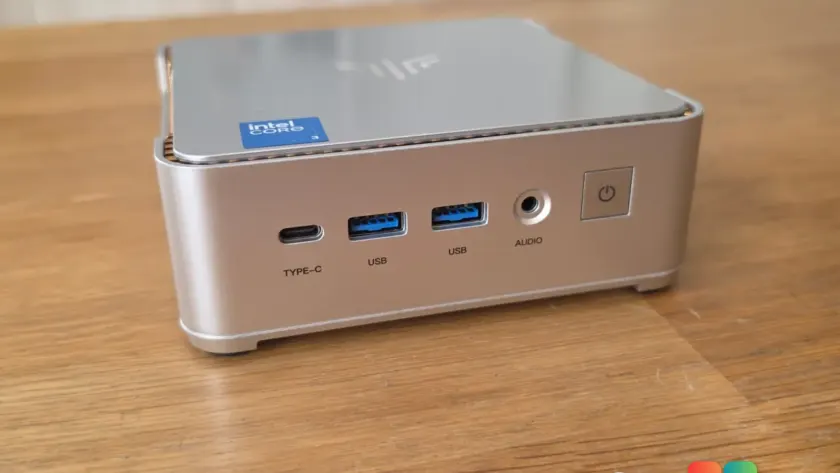
If you’re shopping for a no-frills desktop that handles web browsing, document editing, and video calls without breaking the bank, the NiPoGi P2 mini PC is making a case for itself. Neowin’s review frames it as a budget office or student-class machine built around Intel’s Wildcat Lake processor and a dedicated NPU — a computer aimed squarely at productivity, not gaming.
What the NiPoGi P2 mini PC actually is
The NiPoGi P2 is a compact mini PC from NiPoGi, a maker known for offering capable hardware at aggressive price points. The brand has built a reputation on squeezing modern components into small, affordable chassis, and the P2 follows that playbook.
Where the P2 differentiates itself is in its choice of silicon. Instead of an older or lower-tier chip, it uses Intel’s Wildcat Lake — the mobile SoC behind the Intel Core Ultra Series 3. That places it a step above many budget mini PCs that lean on older Core i-series or Celeron parts.
The positioning is clear: this is a machine for people who want a modern, efficient, and capable everyday computer but have no interest in gaming. If your daily routine revolves around spreadsheets, browser tabs, streaming, and remote work, the P2 is aimed right at that use case.
Wildcat Lake under the hood
Wildcat Lake is Intel’s mobile architecture that powers the Intel Core Ultra Series 3 lineup. It uses a hybrid design combining performance cores, efficiency cores, and low-power efficiency cores, all managed by Intel’s Thread Director to balance workloads and preserve power efficiency.
For office and student use, that hybrid approach matters. Light tasks can run on the low-power cores to keep the system quiet and energy-efficient, while heavier operations get pushed to the performance cores. The result is a machine that feels responsive for everyday work without drawing a lot of power or generating much heat.
Wildcat Lake also brings Intel’s latest integrated graphics, which handle display output and light media tasks competently. Just don’t expect it to tackle demanding games — that’s not what it’s built for, and the review is explicit about that.
The dedicated NPU angle
One of the more notable features of the P2 is its dedicated NPU (Neural Processing Unit). Intel bundles this AI accelerator into the Core Ultra chips, and it’s designed to handle machine-learning workloads off the main CPU and GPU.
In practice, that means background AI tasks — things like noise suppression during video calls, background blur, or on-device AI assistants — can run more efficiently without draining battery or bogging down the system. For a student or remote worker who spends a lot of time on video calls, an NPU-backed experience can make a real difference in call quality.
Intel has been pushing the NPU as central to its AI strategy on Windows, and the P2 gives budget buyers access to that capability without paying premium prices. Whether you’ll lean heavily on it depends on your software, but the hardware is there and ready.
What this means for you
The NiPoGi P2 isn’t trying to be everything to everyone. It’s a focused machine for people who want a reliable, modern desktop for work and study at a price that stays sensible. If you’re upgrading an old, slow desktop or setting up a home office on a budget, it’s worth a look.
It’s a strong fit if your needs look like this:
- Daily web browsing with many tabs open
- Document editing in Word, Excel, or similar
- Video conferencing with decent background and audio handling
- Media streaming and light multitasking
It’s a poor fit if you need to render video, run heavy 3D software, or play modern games — keep those expectations aligned with its positioning, and it should serve you well.
The bigger takeaway is that budget mini PCs are getting more modern. Having Wildcat Lake and a dedicated NPU available at an affordable price point reflects how quickly these features have trickled down from premium laptops to cheaper desktops.
How to get it
The NiPoGi P2 is available through NiPoGi’s retail channels and third-party online marketplaces. As with any budget hardware, it’s worth comparing configurations and checking current pricing, since specs and availability can vary by region and seller.
If you’re in the market for a quiet, low-power desktop for everyday tasks, the P2 is a reasonable option to weigh against competitors. Just be clear with yourself about what you need it to do — and leave the gaming to something with a dedicated graphics card.
Source: Neowin
Over to you: Would you grab a budget Wildcat Lake mini PC for your home office, or stick with your current desktop?