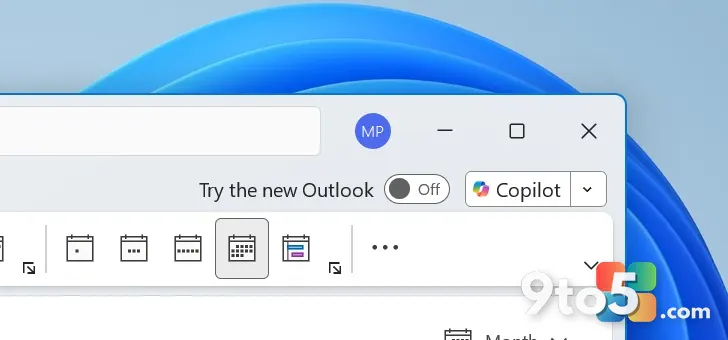
Microsoft has officially confirmed it is not backing down from its plan to force the New Outlook for Windows transition by March 2027. Instead, the company is focusing on removing the friction that has frustrated users trying to make the jump. According to a recent update posted on the Microsoft 365 admin portal, Microsoft is deploying a fix for a persistent bug that broke automapped calendars during the switch, alongside a broader backend upgrade to shared calendar syncing.
For years, Outlook Classic has been the default for enterprise and power users, but the push toward the web-based New Outlook has created a divide. The primary complaint from holdouts has been data loss or misconfiguration when toggling between the two clients. Microsoft is now addressing that directly.
#1 Automapped Calendars Now Carry Over Automatically
Until now, switching from Outlook Classic to New Outlook for Windows was a disruptive experience for users relying on automapped calendars. These are shared calendars that automatically appear in your Outlook client based on your organization’s directory settings, often used for team schedules, resource booking, or departmental updates.
When users toggled to New Outlook, these automapped calendars did not automatically carry over. The result was a blank calendar view that required users to contact their IT administrators to manually migrate the calendar mappings. This created a significant support burden and discouraged adoption of the new client.
Microsoft has now resolved this issue. In the admin portal update, the company stated: “Users will be able to automatically see their automapped calendars when toggling from classic Microsoft Outlook to new Outlook for Windows.” This message applies to both the desktop versions of Classic and New Outlook.
The feature began rolling out to users in early June 2026. Microsoft expects the rollout to complete by the end of August 2026. Once the update reaches your device, the transition should be seamless. You can verify the calendar is present by opening Outlook, navigating to the Calendar view, and clicking My Calendars. Your automapped calendar should appear in the list without requiring any manual re-subscription.
#2 Shared Calendars Upgrade to Modern REST Model
In addition to the toggle fix, Microsoft is undertaking a significant backend overhaul for shared calendars in Outlook and Exchange Online. Currently, shared calendars rely on the legacy MAPI (Messaging Application Programming Interface) model. While MAPI has been the standard for decades and works adequately for most users, it can sometimes lead to sync delays or inconsistencies, particularly in large organizations with heavy delegation setups.
Microsoft is moving shared calendar synchronization to a modern REST (Representational State Transfer) model. According to the admin center update spotted by Windows Latest, this server-side upgrade is designed to improve calendar sync reliability, performance, and consistency for delegates and users who access shared calendars.
Because this is a server-side change, it is largely invisible to the end user. Microsoft notes that “the change is designed to be seamless and will not require any action from users or administrators.” You should notice faster updates when others modify shared calendar events and fewer sync errors.
The rollout for the shared calendar upgrade is scheduled to begin in August 2026 and will be completed by the last week of September 2026.
#3 Known Issues and Migration Details
While Microsoft emphasizes that the transition will appear seamless, there are a few technical details IT admins and power users should be aware of during the migration window.
Microsoft warns that a new calendar folder may remain hidden immediately after creation until the migration process finishes. The folder will only become available to everyone once the sync is completed and validated on the backend. This is a temporary state and should not cause long-term access issues.
Additionally, the initial sync window excludes events older than one year. If you rely on historical shared calendar data for legal or compliance reasons, you may need to verify that older events are accessible through other means, though the new REST model is expected to handle historical data more efficiently in subsequent syncs.
For users still on Outlook Classic, there is a toggle setting labeled “Turn on shared calendar improvements.” When this setting is enabled, Outlook uses the new REST model. If you turn it off, Classic Outlook will continue to use the MAPI-based model. New Outlook for Windows does not have this toggle and will use the REST model by default.
What This Means for You
For the average user, these changes mean the switch to New Outlook is becoming less risky. The loss of automapped calendars was a major barrier to adoption, and fixing it removes a significant pain point. If you are still using Outlook Classic, you can now toggle to New Outlook with confidence that your shared calendar access will remain intact.
For IT administrators, the server-side REST upgrade reduces the need to troubleshoot sync issues related to shared calendars. The exclusion of events older than one year from the initial sync is a performance optimization, but admins with strict data retention requirements should monitor the rollout closely in August and September 2026.
Beyond calendar improvements, Microsoft continues to integrate Copilot features into Outlook. Recent updates have brought Copilot to the email compose box and added alerts for replying to outdated messages in active conversations. These features are rolling out alongside the calendar improvements, signaling that New Outlook is becoming the primary vehicle for Microsoft’s AI-driven productivity updates.
How to Get It
The automapped calendar fix is rolling out via Microsoft 365 updates. Ensure your Outlook for Windows is set to receive updates automatically. If you do not see the change by late August 2026, check for the latest cumulative update in File > Office Account > Update Options.
The shared calendar REST upgrade is server-side and requires no action. However, if you are managing a large fleet, review the admin portal update for specific guidance on monitoring the migration progress and validating calendar access post-rollout.
Source: Windows Latest
Over to you: Are you sticking with Classic Outlook until the 2027 deadline, or have you already made the switch to New Outlook?