Microsoft has reaffirmed its commitment to migrating every Outlook Classic user to New Outlook by March 2027, a decision made despite mounting criticism from enterprise customers who describe the transition as disruptive. The company’s roadmap, confirmed earlier this year, sets a clear deadline for the opt-out phase in enterprise environments, giving organizations roughly 12 months to prepare for the shift.
This timeline marks a significant shift from previous plans, which originally targeted an opt-out start in April 2026. The extension provides more lead time, but the core mandate remains unchanged: New Outlook will become the default experience for all users, regardless of preference or organizational feedback.
What’s Changing in the Roadmap
The updated schedule outlines a structured transition for enterprise customers. Microsoft noted that the opt-out phase for Enterprise environments will now begin in March 2027, replacing the earlier April 2026 target. This adjustment offers organizations additional time to evaluate the new client and address compatibility concerns.
However, the roadmap also highlights that timelines for GCC High and DoD environments will be communicated separately at a later date. This distinction suggests that government and defense sectors may face a different migration path, potentially due to specific security or compliance requirements that differ from standard enterprise deployments.
For years, Outlook Classic has been the backbone of corporate email workflows. Its stability, extensive add-in support, and familiar interface have made it a staple for power users. The push toward New Outlook represents a fundamental change in Microsoft’s strategy, prioritizing a modern, web-based architecture over the legacy desktop application.
Feature Parity and User Feedback
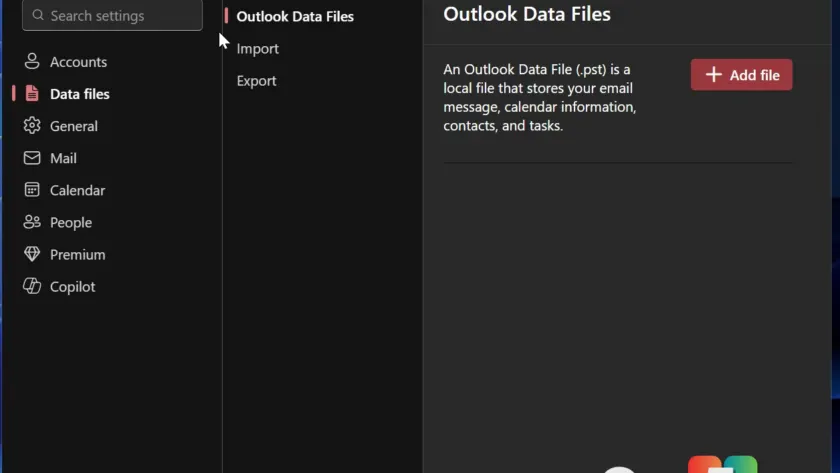
Microsoft has been actively working to close the gap between New Outlook and its classic counterpart. Over the past several weeks, the company has introduced up to 15 new features, including support for .PST files, improved offline attachment handling, and the ability to pin or snooze emails.
While these additions are welcome, many of them were already available in Outlook Classic. Critics argue that the focus should be on resolving core stability issues rather than merely catching up on feature lists. Enterprise customers have reported that New Outlook still lacks several critical functionalities, such as advanced rules, robust add-in support, and seamless integration with certain third-party tools.
The frustration is palpable among users who rely on Outlook for complex workflows. One enterprise customer described the transition as “painful and drives me crazy,” highlighting the real-world impact of Microsoft’s push. Despite these concerns, the company maintains that New Outlook is the future of email productivity.
What Happens After March 2027
For organizations that choose to retain Outlook Classic beyond the opt-out deadline, Microsoft has outlined a specific behavior. Users may find themselves automatically redirected to New Outlook when launching the classic client. This redirection is designed to encourage adoption and streamline the transition process.
Importantly, users will still be able to switch back to Outlook Classic if they prefer. However, Microsoft has warned that the system may revert to New Outlook again, creating a potentially confusing experience for those who resist the change. This approach mirrors previous strategies used when replacing legacy apps like Mail and Calendar.
The decision to enforce this redirection underscores Microsoft’s determination to phase out Outlook Classic. It signals that the company views New Outlook as the definitive solution for email management, regardless of user preference or organizational needs.
What This Means for You
For enterprise IT administrators, the March 2027 deadline requires immediate action. Organizations should begin evaluating New Outlook’s compatibility with their existing workflows and identify any gaps that need to be addressed. Testing in a controlled environment can help mitigate risks and ensure a smoother transition.
For individual users, the choice is more limited. While the opt-out phase provides some flexibility, the long-term goal is clear: New Outlook will become the standard. Users who rely on Outlook Classic for specific features may need to adapt their workflows or explore alternative solutions.
Microsoft’s emphasis on Copilot integration in New Outlook suggests that the company sees AI-driven productivity as a key differentiator. Organizations looking to leverage these capabilities may find the transition more compelling, even if it requires overcoming initial hurdles.
How to Prepare for the Transition
Enterprises can start preparing by enabling New Outlook in a pilot group and gathering feedback from early adopters. This approach allows organizations to identify potential issues and develop mitigation strategies before the full rollout.
IT teams should also review Microsoft’s documentation on feature parity and compatibility to understand what is and isn’t supported in New Outlook. Engaging with Microsoft support and participating in community forums can provide additional insights and resources.
For users who prefer Outlook Classic, staying informed about the roadmap and Microsoft’s communications will be crucial. While the company remains committed to its timeline, ongoing dialogue with customers may influence future adjustments or support options.
The Bigger Picture
Microsoft’s push toward New Outlook reflects a broader trend in the tech industry: the shift from legacy desktop applications to modern, cloud-based solutions. This transition often brings benefits like improved collaboration, enhanced security, and seamless updates, but it also requires users to adapt to new interfaces and workflows.
The success of New Outlook will depend on Microsoft’s ability to deliver a stable, feature-complete experience that meets the needs of enterprise customers. While the company has made progress, the road ahead is challenging, especially given the strong attachment many users have to Outlook Classic.
As the March 2027 deadline approaches, the focus will be on execution. Microsoft must demonstrate that New Outlook is not just a replacement, but a genuine improvement that justifies the disruption. For now, the clock is ticking, and organizations are bracing for a significant change in how they manage email.
Community Reactions and Next Steps
The tech community has been vocal about Microsoft’s plans, with many users expressing frustration over the forced migration. Online forums and social media platforms are filled with discussions about workarounds, alternative clients, and calls for Microsoft to reconsider its approach.
Despite the backlash, Microsoft remains steadfast in its commitment to New Outlook. The company’s roadmap and public statements leave no doubt about its intentions. The challenge now is to bridge the gap between corporate strategy and user expectations.
As we move closer to 2027, the focus will shift from planning to implementation. Organizations will need to navigate the complexities of migration, address user concerns, and ensure that the transition minimizes disruption to daily operations.
Final Thoughts
Microsoft’s decision to force the New Outlook 2027 rollout is a bold move that prioritizes long-term vision over short-term satisfaction. While the company has made strides in improving New Outlook, the road to full adoption is fraught with challenges.
For enterprise customers, the coming months will be critical. Proactive planning, testing, and engagement with Microsoft will be essential to navigating the transition successfully. For users, the message is clear: the future of Outlook is here, and it’s time to adapt.
Source: Windows Latest
Over to you: How is your organization preparing for the March 2027 New Outlook deadline, and what features are you most concerned about losing?
You may also like
 LG Monitor Adware Proves Windows 11 App Installation Controls Need Tightening
 Microsoft Overhauls Windows 11 Update Downloads and Installs to Fix Long-Standing Frustrations
 Global PC Shipments Drop 4% in Q2 2026 as Memory Crisis Breaks Growth Streak
 SCS Software Confirms Euro Truck Simulator 2 UK Rework and Nevada Update Ahead of Console Launch