In an era where data breaches and privacy concerns dominate the tech landscape, relying on mainstream providers like Google Drive or Dropbox for sensitive documents can feel risky. If you prioritize security without sacrificing convenience, Filen stands out as a robust alternative. This service delivers a solid 10GB of free storage while making end-to-end encryption the default standard rather than a premium add-on.
The Case for Encrypted Cloud Storage
The core appeal of Filen lies in its implementation of zero-knowledge encryption. Unlike traditional cloud services that hold the decryption keys to your data, Filen encrypts your files directly on your device before they ever reach their servers. This means that even if Filen’s infrastructure were compromised, your files would remain completely unreadable to unauthorized parties, including the company itself. You alone possess the cryptographic key required to unlock your data, making it an ideal solution for storing tax records, legal documents, medical files, or any other highly sensitive information. This architecture fundamentally shifts the trust model: instead of trusting a corporation to safeguard your data, you rely on cryptographic mathematics, which is significantly harder to bypass.
Platform Support and Core Features
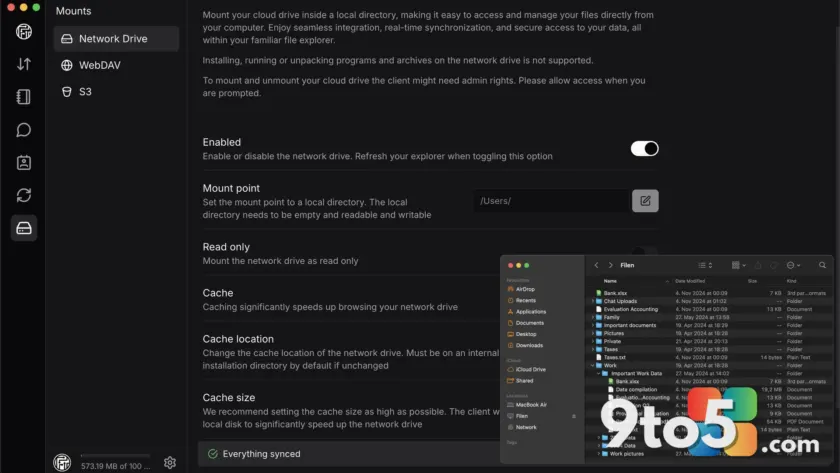
Filen does not limit its reach to a single operating system. The service offers dedicated applications for Windows, macOS, and Linux, alongside native clients for both iPhone and Android. Regardless of the device, your files sync automatically, ensuring you have consistent access to your workspace. Beyond basic storage, the desktop application includes a virtual drive mounter that maps your cloud storage to a local drive letter, allowing you to interact with your files as if they were stored locally on your hard drive. Additionally, secure file sharing is built into the platform, enabling you to distribute encrypted content to others without exposing it to public interception. The interface remains intentionally lightweight, avoiding the bloatware and AI-driven file organization features found in larger competitors.
Storage Tiers and Pricing Structure
For users who primarily need a secure backup for personal documents, the free tier provides a generous 10GB of space at no cost. This allocation is sufficient for most individuals looking to offload sensitive files without paying a subscription fee. If your workflow demands more capacity, Filen offers tiered paid plans that scale storage accordingly. Importantly, upgrading your plan does not alter the security model; every tier, including the free version, maintains the same rigorous end-to-end encryption standards. This consistency ensures that privacy is never a feature gated behind a paywall. Users should note that because the encryption is zero-knowledge, account recovery relies heavily on your master password. Losing it typically means losing access to your data, a trade-off that prioritizes absolute security over convenience.
What This Means for You
Switching to a privacy-focused storage provider requires a shift in how you manage your data. While Filen excels in security, it intentionally avoids the bloatware and AI-driven file organization features found in larger competitors. The interface is straightforward and utilitarian, prioritizing function over flair. For users who value transparency and cryptographic security over integrated productivity suites, Filen delivers exactly what is promised. It serves as a reliable vault for your most critical files, accessible from anywhere while remaining completely opaque to external observers. If you regularly handle sensitive personal or professional documents, the peace of mind provided by zero-knowledge architecture is well worth the minor learning curve.
How to Get Started
Getting started with Filen is straightforward. Visit the official Filen website to create an account, which will immediately grant you access to the 10GB free tier. Download the appropriate client for your operating system from the settings menu, and your cloud storage will begin syncing with your local environment. Once installed, you can drag and drop files into the designated folder, mount the virtual drive, or upload directly through the web interface. The setup process is designed to be intuitive, allowing you to secure your data without a steep learning curve. For maximum security, ensure you store your recovery key in a physically secure location, such as a printed paper copy kept in a safe, since digital recovery options are intentionally limited.
Source: PCWorld
Over to you: Are you switching from Dropbox or Google Drive to a privacy-focused alternative like Filen?
You may also like
 The Ultimate DEX Buyer’s Guide: Choosing the Right Digital Employee Experience Platform
 Why Windows Users Are Ditching Sticky Notes New for a Lightweight Alternative
 Ventoy Update Simplifies Windows 11 Installation by Addressing Strict Hardware Checks
 Visual Studio Code 1.130 Arrives with Major Agent Rearchitecturing